

AI Digital Asset Management: How Intelligent Automation Is Changing Content Organization
Your marketing team just spent three hours looking for one image. Not creating it, just finding it! That perfect product shot went missing somewhere between the shared drive, last quarter’s folder, and someone’s desktop. Sound familiar? It’s basically Tuesday.
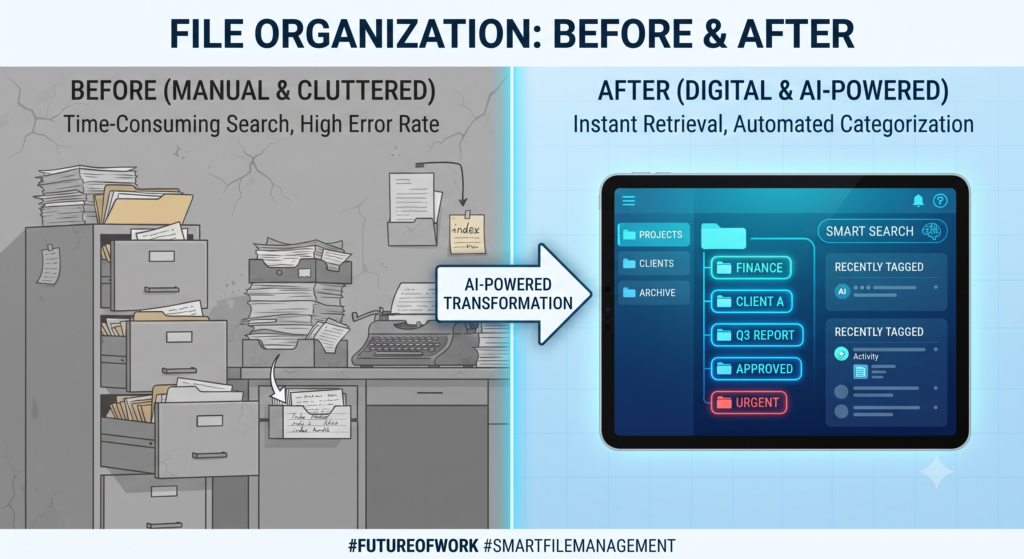
Traditional digital asset management was supposed to fix this. Instead, teams ended up with fancy folders searchable on paper, messy in real life. One person tags a file “product-final-v2.” Someone else calls the same image “hero-shot-draft.” Duplicates pile up. Old versions sneak into campaigns. Nobody’s sure what the “real” file even is, and file management turns into a full-time guessing game.
This is where AI digital asset management flips the script! That three-hour search? Cut down to seconds. AI scans what’s in every image and tags it automatically no more guessing games with file names. Duplicate uploads get marked before they pile up, reducing manual work across the whole library The “which version is real” confusion? Gone, because every asset carries accurate, consistent metadata from day one.I think that using a comprehensive and clear asset management system can save our time and effort.
It’s not just cleaning up after you, it truly understands your content.”
So in this guide, we’re breaking it down: what AI digital asset management is, how it works, and why teams who switch stop drowning in content chaos and start scaling, finally.
What Is AI Digital Asset Management?
AI digital asset management is the smarter evolution of traditional DAM. Here, intelligent automation, not manual labor, does the heavy lifting No more wasting hours on labeling images or digging through folders. Machine learning models actually analyze what’s inside each asset, objects, faces, text, colors, even brand elements. Then they auto-generate accurate, searchable metadata in real time. It’s the difference between a static filing cabinet and a system that actually understands what it’s storing!
And this isn’t basic tagging anymore. Today’s AI DAM platforms use natural language processing for conversational search. Type “show me summer campaign shots with red backgrounds” get instant, accurate results.It even learns your usage patterns so it can suggest the right asset before you finish typing . This isn’t just storage. It’s content intelligence, built for how fast teams actually create today.
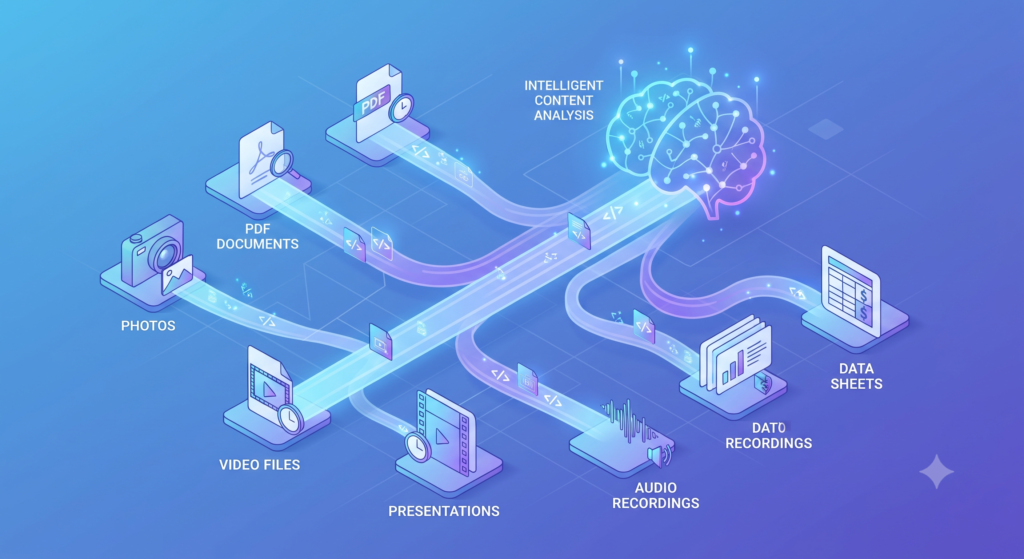
Core AI Technologies Powering Modern DAM Systems
Most DAM articles just say “AI tags your photos.” That’s not the real story. Here’s what’s actually running under the hood, and what’s new in 2026.
Computer Vision
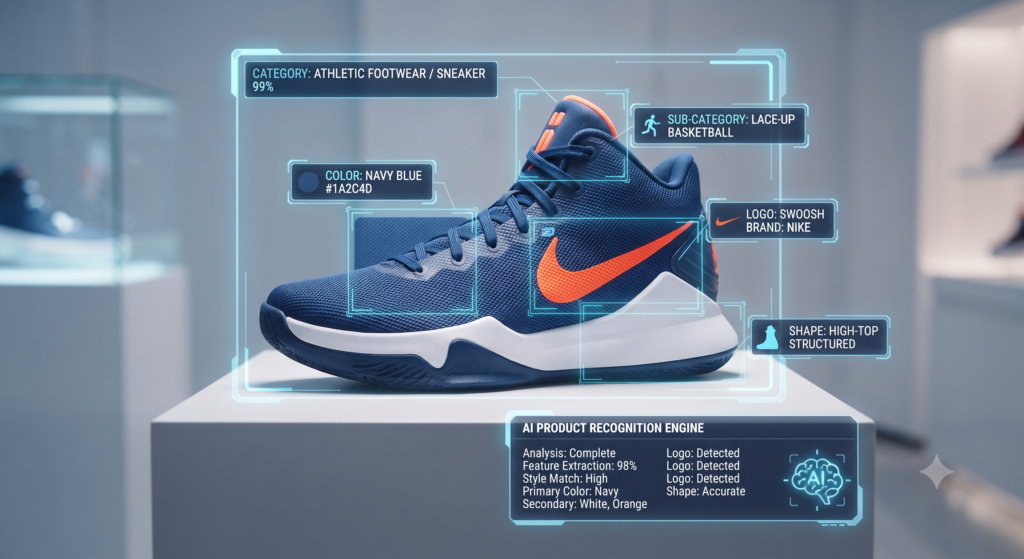
Computer vision doesn’t just spot a dog in a photo anymore. Modern systems use something called vision transformers, a newer and sharper version of the older CNN models most DAM tools used just a few years back. These models take an image and break it down into small patches, then look at how those patches connect to one another. That’s essentially how the system figures out whether a logo is printed on someone’s shirt or just sitting on a wall in the background. . Some platforms now also generate visual embeddings, basically a numeric fingerprint for every image. That fingerprint lets the DAM find visually similar assets, even if nobody ever tagged them with matching keywords.
Machine Learning
Machine learning here isn’t just “the system learns over time.” It’s usually doing two specific jobs. Classification models sort assets into categories, like product shots versus lifestyle photos. Clustering models group similar assets together without anyone telling them the categories first. This second part matters a lot right now, because it’s how DAM tools catch duplicate or near-duplicate uploads before they clutter your library. Some platforms are also starting to use reinforcement learning. The system adjusts its tagging based on what users accept or reject.
Deep Learning
Deep learning is the engine behind both computer vision and a lot of today’s generative features. Neural networks with many layers can pick up on details a simple model would miss, tiny brand color variations, partial logos, even the mood or style of an image. This is also what powers newer additions like AI-assisted background removal, smart cropping for different aspect ratios, and even auto-generated alt text that actually describes what’s happening in a scene, not just listing objects.
Natural Language Processing (NLP)
Older NLP just matched keywords through basic keyword matching. It understands meaning, not just words. Search for “cheerful outdoor summer campaign” and it can pull relevant images even if that exact phrase was never in the file name or tags. It works the same way as the image fingerprinting we mentioned earlier just applied to words instead of pictures . Some newer DAM tools have also added chat-style assistants, built on large language models, so users can ask questions in plain conversation instead of using difficult search filters. It works the same way as the image fingerprinting we mentioned earlier just applied to words instead of pictures. Some newer DAM tools have also added chat-style assistants, built on large language models, so users can hold conversational queries in plain language instead of wrestling with difficult search filters. Combine that with visual matching and you get hybrid search one query, results pulled from both meaning and pixels at once.
.
Optical Character Recognition (OCR)
OCR has moved past simply reading text off a scanned page. Newer versions understand layout too, so they know the difference between a headline, a caption, and fine print inside a document or image. Multi-language OCR has also improved a lot, which matters for global brands managing assets across regionsSome platforms now combine OCR with computer vision for embedded text detection, so a sign inside a photo doesn’t just get read, it gets connected to the object or location it’s part of. Add in speech-to-text transcription and automatic AI captioning for video, and suddenly your library’s audio and on-screen text are just as searchable as the pixels themselves
Key AI Capabilities in Modern DAM
Automated Metadata Generation
Tagging a photo with two or three keywords used to be the whole job! Not anymore. Today’s systems go way beyond the basics, building genuine metadata management into every upload. Yes, they still capture the technical details resolution, format, file size, populating metadata fields and descriptive metadata automatically. But they also pick up on context, the mood of a shot, the setting, what’s actually going on in the frame, offering smart metadata suggestions as a metadata foundation for the whole library.
Connect it to your legal or contract tools, and it’ll even pull usage rights and license expiry dates automatically. Some platforms take it one step further and flag you before a license quietly runs out, keeping metadata quality and metadata consistency intact across thousands of files without a human double-checking each one that’s usually the moment teams realize AI-assisted metadata just saved them from a compliance disaster they never saw coming!
Visual Search and Recognition
Here’s something most people don’t expect: you don’t need a tag at all anymore! Upload one image you like, and the system hunts down visually similar ones on its own through reverse image search and reference image search, including assets nobody ever got around to labeling. That’s a massive win for staying on-brand. Want every image using one exact shade of blue? Run a visual content search directly. You’ll get genuinely accurate matches, not a shaky guess based on whatever someone happened to name the file.
This kind of content-based discovery turns asset retrieval into near-instant retrieval — seconds instead of scrolling through folders. It’s also how teams stumble onto assets they’d forgotten they even had, turning old libraries into a source of fresh content discovery instead of digital dead weight.
Workflow Acceleration
The real breakthrough isn’t just faster processing, it’s that nobody’s stuck waiting around anymore! AI routes each asset to the right approver automatically, based on the content itself and how it’s meant to be used. Anything already pre-approved? That extra review step gets skipped entirely. It also catches version conflicts early, before two people end up overwriting each other’s work, something almost every team has dealt with at least once! Less waiting, fewer holdups. Campaigns actually go live on time instead of getting stuck in someone’s inbox.
AI DAM vs. Traditional DAM
| Capability | Traditional DAM | AI-Powered DAM |
| Metadata Tagging | Users add tags and metadata manually. | AI assigns relevant tags automatically and learns from corrections. |
| Asset Search | Search depends on accurate keywords and tags. | AI finds assets through keywords, meaning, and visual content. |
| Asset Onboarding | Each new file needs manual sorting and classification. | AI analyzes, classifies, and tags files during upload. |
| Brand Governance | Teams manually check assets for brand compliance. | AI detects outdated, inconsistent, or potentially off-brand assets. |
| Version Control | Teams track file versions and changes manually. | AI identifies related versions and highlights important changes. |
| Library Scalability | Growing libraries increase manual workload and management effort. | AI manages large libraries and improves through usage patterns. |
| Search Expertise | Users need knowledge of tags and metadata structures. | Natural-language and visual search make discovery easier |
The Mechanics of AI Tagging: Breaking Down Asset Ingestion
So what actually happens the second you hit upload? It’s not just sitting there waiting for someone to get around to tagging it. That part’s over — even batch ingestion of hundreds of files at once gets the same treatment as a single upload.
The system scans the file using machine learning, and it’s not just glancing at what’s in the picture. It’s picking up on the visual stuff, objects, colors, faces, whatever’s actually happening in the shot. If there’s text buried in there, it reads that too. And if there’s audio? It catches that as well. Now here’s the part that actually matters: it doesn’t just throw a bunch of random labels at the file and call it done. It manages a controlled vocabulary with a set of terms your team is already using, applying real taxonomy management through taxonomy mapping instead of guesswork. That’s exactly what stops one person from calling a file “product-final” while someone else names the same thing “hero-shot-v2.” And the moment it’s tagged, it’s already indexed, folded straight into a structured library and organizational taxonomy that keeps everything browsable and instantly searchable. Nobody has to circle back later and clean it up!
The DAM Process Life Cycle
The DAM Process Life Cycle
1. Creating the Asset
Here’s something people miss: the lifecycle doesn’t really begin at upload. It begins way earlier, the second someone snaps a photo, builds a design, or exports a video. Smarter teams have started baking metadata into the file right from creation, camera settings, project codes, even what the asset’s meant to be used for. So by the time it actually reaches the DAM, it’s not showing up empty-handed. Less cleanup later, fewer blanks to fill in now.
2. Encoding and Indexing
Encoding used to just mean turning a file into a standard format and moving on. Not anymore. While that conversion happens, the system’s also quietly building those visual fingerprints we mentioned earlier, the ones that help AI spot similar assets down the road. And indexing? That happens when almost the second encoding wraps up. So the file isn’t just sitting in storage, it’s searchable within seconds of arriving.
3. Implementing Workflows
Workflows used to be one fixed path for everything. Not the case anymore. Today’s DAM platforms actually adjust the route depending on what the asset is. A quick social graphic might skip legal review altogether. A client-facing video might automatically get sent through three different approvers. And the system’s making that call on its own, based on the content itself and what’s worked before, not some rigid checklist somebody wrote up years ago.
4. Version Control
Old-school version control basically meant tacking “v2” onto a filename and hoping nobody got confused. Now the system tracks every change on its own, who touched it, when, and what changed, without anyone having to log it manually. And if two people happen to edit the same file at once? It catches that conflict right away instead of letting someone’s work get quietly wiped out.
5. Governance Through Permissions
Permissions used to be pretty binary, you could see a folder, or you couldn’t. That’s changed a lot. Now access can get really specific. A freelancer might see draft versions but not the final approved files. A regional team might only get access to assets cleared for their particular market. Some platforms even set these permissions automatically, based on metadata that’s already attached to the file, so nobody’s stuck manually configuring access every time.
6. Auditing and Monitoring
get content in seconds. But managing it? That’s where most teams quietly fall apart. The excitement of speed wears off fast when nobody can find the right version, when legal flags a claim nobody fact-checked, or when a client asks “wait, did a human even look at this?”
Here’s the truth nobody likes admitting: generating content was never the hard part
at scale, responsibly, is the real work.
Upload Asset
│
▼
AI Content Analysis
│
▼
Computer Vision + OCR + NLP
│
▼
Metadata Generation
│
▼
Content Categorization
│
▼
Search Index Creation
│
▼
Intelligent Asset Retrieval
Handling AI-Generated Content the Right Way
AI can produce content in seconds. But managing it? That’s where most teams quietly fall apart. The excitement of speed wears off fast when nobody can find the right version, when legal flags a claim nobody fact-checked, or when a client asks “wait, did a human even look at this?Here’s the truth nobody likes admitting: generating content was never the hard part. Managing AI-generated content at scale, responsibly, is the real work.change wording into simple language as ist sentence
Stay Alert to Legal Risks
This is the thing that actually keeps legal teams awake and fair enough, because it should.AI doesn’t lie on purpose. But it does something almost worse. It sounds confident even when it’s dead wrong. It might echo a copyrighted line without meaning to. It might slap a quote on the wrong person. It might state a “fact” like it’s gospel, when really it’s just a well-worded guess.
In 2025, this stopped being a hypothetical. Several publishers got hit with takedown notices after AI-generated content ended up mirroring work that already existed, sometimes word for word.
So stop treating legal review as the annoying step that slows down publishing.
. Flip it. A five-minute compliance check before something goes live isn’t a bottleneck — it’s cheap insurance against a cleanup that costs way more time, money, and credibility later
.
Refresh Your Brand Voice Rules
Your old brand guide probably never mentioned AI. That’s a problem now. Tone, voice, even the words your brand refuses to use all of it needs an AI-specific addendum, because generative tools don’t instinctively know what “sounds like you.”
Think of it less like a rulebook and more like training a new hire. You wouldn’t hand someone a five-year-old style guide and expect perfect output. Your brand voice framework needs the same refresh, just faster.
Add Metadata to Track Origin
Here’s one team doesn’t think about until it actually bites them: forgetting to tag AI-generated content as, well, AI-generated. Without a proper metadata field tracking content origin, model version, and edit history, you lose the paper trail the second something goes sideways.
It feels like a minor detail. It’s not. The moment a regulator, a client, or even someone on your own team asks “was this written by AI, and which model,” you need that answer instantly not after digging through six-month-old Slack threads hoping someone remembers.
Measure What’s Actually Working
AI content isn’t “set it and forget it.” Some pieces perform beautifully. Others flop, even when the prompt looks identical. The only way to know which is which is disciplined performance tracking engagement, dwell time, conversion, the whole picture.
Numbers don’t lie, even when your gut feeling does. Let the data decide what gets scaled and what gets quietly retired.
Security, Compliance, and Industry Use Cases
AI-Powered Security and Compliance
Static rules can’t keep up anymore. Threats evolve daily; static rulebooks don’t.
AI-powered security systems now use behavioral baselines instead of fixed rules. They learn what “normal” looks like for each user, then flag deviations, a login from an unusual location, a sudden spike in file downloads, access at odd hours.
Compliance has shifted too. Frameworks like the EU AI Act and the NIST AI Risk Management Framework now shape how companies document and monitor AI systems. Compliance monitoring tools map activity directly against these frameworks, so audits stop being a once-a-year scramble and become a running log instead.
There’s a newer wrinkle, though: model drift. An AI system trained on last year’s data doesn’t automatically stay accurate. Teams now track drift the same way they’d track a security vulnerability because an inaccurate model quietly becomes a compliance risk of its own.
Data Privacy and Consent Management
Here’s what most teams get wrong. They assume “secure” and “private” mean the same thing. They don’t.
Data privacy in AI systems means knowing exactly what data trained the model, and whether that data had proper user consent attached to it in the first place. Under GDPR and newer state-level laws like the California Delete Act, that question isn’t optional anymore, it’s enforceable.
Consent management platforms are catching up to this shift. Newer tools now track consent at the data-point level, not just the account level. So if a user withdraws consent for one type of data use, the system can act on just that without wiping their entire profile.
The tricky part is AI-specific data retention. Once a model trains on a dataset, “deleting” that data doesn’t always undo its influence on the model itself. Companies are only now building processes retraining, fine-tuning, selective unlearning — to actually handle that gap.
Healthcare systems now pair HIPAA compliance checks with AI that flags unusual record access in real time not just who viewed a file, but whether that access pattern matches their role at all.
Financial services use AI-driven fraud detection models that update themselves as fraud tactics shift, rather than relying on a fixed rule list that fraudsters eventually learn to dodge.
Retailers increasingly deploy AI at the point of transaction itself, catching payment anomalies before checkout completes, instead of after a chargeback lands.
Government and infrastructure agencies use AI for cybersecurity threat detection tied to supply-chain risk watching not just their own systems, but the vendors and software dependencies feeding into them.
The shared thread: security today isn’t a checklist. It’s a constantly updating model of what “normal” looks like, industry by industry.
Operationalizing AI in Your Organization
Identifying Top Pain Points
Most AI rollouts fail before they even get going. And it’s rarely the tech’s fault. It’s that nobody stopped to figure out where the actual bottleneck was hiding.
Teams love jumping straight to “let’s add AI tagging.” But slow search, duplicate uploads, approval delays because someone can’t find the latest version these are different problems with different fixes. Skip the diagnosis, and you’ll fix the wrong thing.
Here’s a simple test: time how long an asset sits between upload and first reuse. If that number’s ugly, you’re probably looking at a discoverability issue, not a storage one. That one distinction changes everything about which tool you actually need.
Multiple Ways to Integrate AI in DAM
No single “right” starting point exists, honestly. Some teams begin with auto-tagging the moment a file lands. Others start with duplicate detection, cleaning up the near-identical clutter that quietly wrecks search accuracy.
One approach worth watching: embedding-based search. Instead of leaning on tags alone, AI indexes assets by visual or contextual similarity. So “product shot, outdoor, blue background” can still surface the right file, even if nobody bothered tagging it that specifically.
The real mistake? Trying to do all of this on day one. Pick one entry point. Get it working. Then expand slowly.
Measuring ROI on AI Implementation
Most teams can tell you what the AI does. Fewer can tell you what it actually saved them.
Forget cost-per-license as your headline number. The metric that matters is time-to-asset how much faster people find and reuse content now versus before. Some teams watch retrieval time fall from minutes to seconds once semantic search takes over from manual tagging.
Then there’s the quieter cost: rework. Every time someone recreates something because the original was buried, that’s money nobody’s tracking. Cut that, and you’ll usually have leadership’s attention faster than any other metric.
Bottom line: don’t judge success by how many people adopted the tool. Judge it by what stopped being a headache.
Benefits of Involving AI in the DAM Process
Turn Sample Planning From a Chore Into a Click
Sample planning used to eat whole afternoons. Endless spreadsheets. Manual cross-checks.
AI takes that load off now. It scans sample metadata, compares it against what’s already on file, and catches gaps early. A task that took hours now takes minutes. Problems surface before they hit the field team.
Make Sense of Overwhelming Environmental Data
Environmental data rarely arrives clean. Mixed formats. Different sensors. Different sources.
AI sorts it out anyway. It cleans up environmental data, applies consistent tags, and makes everything searchable. Less time untangling files. More time actually studying results.
Personalized Results
Different people need different things from the same library. A field researcher wants raw numbers. A compliance lead wants a paper trail.
AI picks up on that over time. Personalized search adjusts based on someone’s role and history. Less digging through irrelevant files. Faster access to what actually matters.
Tags That Show Up Before You Ask
The shift here: tags appear before anyone asks for them.
Predictive tagging looks at past samples and sensor patterns to label new data as it comes in. Fewer files sit around untagged. Fewer searches turn up empty.
Semantic and conversational search
Semantic and conversational search replaces tag-matching with actual understanding. It runs on vector embeddings turning images and text into numerical representations, then measuring how close a query sits to each asset. So “moody outdoor shot, early light” finds the right file, even without that exact tag.
The conversational layer adds multi-turn context. Ask “show me last campaign’s set, but brighter,” and it remembers what “the set” means from your previous query, no need to restate everything.
One catch: it’s only as good as the model behind it. Weak embeddings give confident, wrong results. Test it on messy, real phrasing before trusting it in production.
| Business Benefit | Business Impact |
| Faster asset retrieval | Saves employee time |
| Automated metadata | Reduces manual work |
| Intelligent search | Finds assets instantly |
| Better collaboration | Improves team productivity |
| Compliance monitoring | Reduces legal risks |
| Smart recommendations | Reuses valuable content |
| Stronger security | Protects sensitive files |
| Workflow automation | Speeds project delivery |
Passive income
By building digital assets we can create passive income streams.In the initial step it needs effort and then. ongoing maintenance.
Flipping Digital Assets
Digital assets can be sold also. As websites,social media accounts and newsletter can be grown and sold for a decent profit.
The Future of AI Digital Asset Management
Common and Emerging Trends
DAM isn’t standing still. Honestly, it’s hard to keep up.
Generative AI now creates asset variations on the fly. Different sizes. Different colors. Different formats. No designer needed. Then there’s multimodal search. It’s quietly changing how people find things. Type roughly what you want. The system understands images, video, and text together. It finds the file anyway. Feels like magic the first time.
There’s also a shift toward federated DAM. Instead of one giant system, AI connects separate libraries. Departments keep their own control. Search still works across everything.
This one’s moving fast. Faster than most teams expected.
AI agents now handle routine checks on their own. A new asset shows up missing rights documentation. The agent catches it. Flags it. Send it to legal. Nobody had to remember. That’s a relief for teams used to things slipping through.
Some teams push further. They test agents running entire workflows: ingest, tag, check compliance, route for approval. A person steps in only when the agent gets stuck. Not full autonomy yet. And that’s okay. The direction is clear, though less manual clicking, more trusting what the agentic workflow already got right.
While computer vision identifies visual information, Machine Learning helps the platform become smarter over time. When users frequently search for certain assets together, approve similar files, or download related content, the AI recognizes these patterns and improves future recommendations.
This adaptive learning process supports Predictive Analytics, smarter categorization, and highly personalized search experiences that become increasingly accurate with continued use.
Imagine a marketing department preparing seasonal campaigns every year. After observing previous projects, the platform can recommend logos, promotional graphics, product photos, and campaign templates before employees even begin searching. These intelligent suggestions reduce repetitive tasks while improving efficiency. Combined with AI-powered Recommendations and Predictive Tagging, machine learning transforms digital asset management from reactive storage into proactive business assistance that supports daily decision-making.
How AI Tagging and Metadata Automation Work
Every digital file contains valuable information, yet much of that information remains hidden unless someone describes it. Traditionally, employees had to add titles, keywords, categories, and descriptions by hand. That process was slow and often inconsistent because different people used different naming styles.
AI Digital Asset Management replaces this manual work with intelligent automation. As soon as a file enters the platform, Artificial Intelligence begins analyzing its content using Computer Vision, Natural Language Processing (NLP), Optical Character Recognition (OCR), and Machine Learning. Within seconds, the system understands what the asset contains and creates meaningful metadata without human effort.
The workflow follows a logical sequence. An image is uploaded, AI identifies objects, colors, people, logos, and locations, while OCR extracts visible text from documents or graphics. For video and audio files, Natural Language Processing (NLP) converts speech into searchable text and identifies important topics. The platform then performs Metadata Tagging, Automated Tagging, Content Categorization, and Document Indexing before storing everything inside a searchable repository. The result is a library of Searchable Digital Assets where users can locate content through simple, natural searches instead of remembering exact filenames.
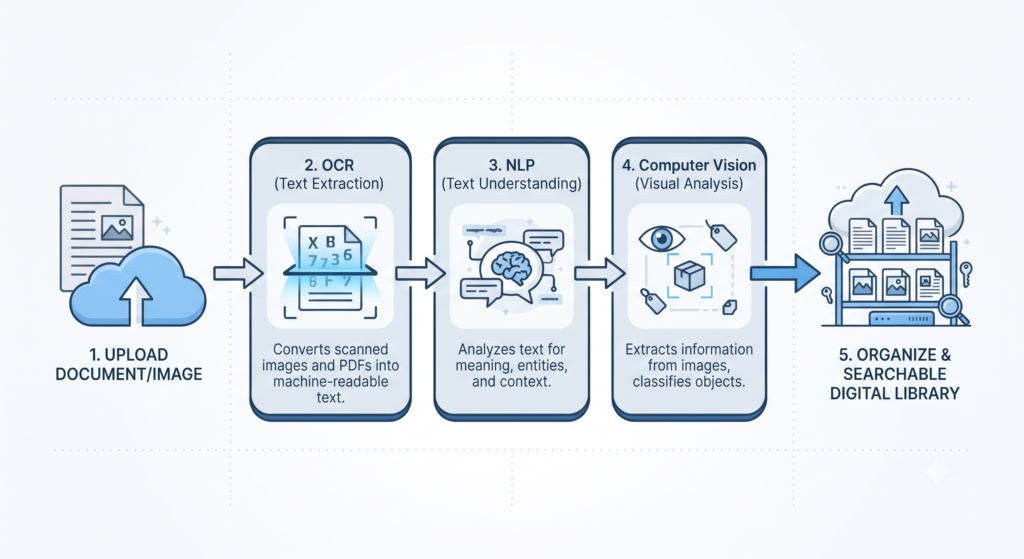
The AI Tagging Workflow:
Upload Asset
      ↓
AI Content Analysis
      ↓
Computer Vision + OCR + NLP
      ↓
Metadata Generation
      ↓
Content Categorization
      ↓
Search Index Creation
      ↓
Intelligent Asset Retrieval
Key Features of AI Digital Asset Management Systems
Automated Metadata Generation
One of the biggest advantages of AI Digital Asset Management is Automated Metadata Generation. AI examines every uploaded file and creates descriptions, keywords, categories, dates, object labels, and contextual information automatically. A photograph showing a mountain lake during sunset may receive tags such as “nature,” “outdoor,” “travel,” “lake,” and “sunset” without anyone typing a single word. This intelligent AI Asset Tagging dramatically reduces manual work while improving search accuracy across the organization.
Consistent metadata also improves governance and collaboration. Marketing, legal, and creative departments all access the same standardized information, eliminating confusion caused by inconsistent naming conventions. Through continuous learning, the platform refines its Metadata Automation capabilities and becomes more accurate as additional content is uploaded. Organizations save countless hours while ensuring every digital asset remains organized and easy to retrieve.
Visual Search and Recognition
Traditional search depends on filenames or manually assigned keywords. That approach often fails when users cannot remember exactly how a file was labeled. Visual Search changes the experience by allowing users to search using an image or a simple description. Instead of typing “blue running shoes campaign,” someone can upload a similar image, and the system instantly identifies visually related assets through AI-powered Search.
Behind this capability, Computer Vision analyzes colors, shapes, textures, objects, faces, and brand logos to identify similarities across thousands of files. Retail companies use this technology to locate matching product images, while marketing teams quickly discover campaign visuals from previous projects. Combined with intelligent Content Discovery, visual recognition transforms enormous digital libraries into accessible collections where valuable content never remains hidden.
Intelligent Workflow Automation
Managing digital assets involves much more than storage. Files often require approvals, reviews, edits, publishing schedules, and distribution across different departments. Performing these tasks manually slows projects and increases the risk of mistakes. Workflow Automation eliminates repetitive administrative work by automatically routing files to the correct people based on predefined business rules. This allows creative teams to focus on producing content instead of tracking approvals.
Intelligent systems also improve collaboration by suggesting reviewers, assigning permissions, and notifying stakeholders when action is required. Features such as Smart Workflows, Asset Approval Workflow, and automated Content Distribution keep projects moving without unnecessary delays. A marketing campaign, for example, can move seamlessly from design to legal review and final publication without employees manually forwarding files. The result is faster production, stronger compliance, and more consistent business operations.
Feature Summary
| Feature | What It Does |
|---|---|
| Automated Metadata Generation | Creates descriptions, keywords, and tags automatically |
| Visual Search and Recognition | Finds assets using images instead of exact filenames |
| Intelligent Workflow Automation | Routes files for approval, review, and publishing automatically |
AI DAM vs. Traditional Digital Asset Management
According to Gartner’s Magic Quadrant for Digital Asset Management Platforms, AI is increasingly reshaping how organizations evaluate DAM platforms — separating solutions built around enterprise content reuse and automation from those focused on traditional marketing needs. Many organizations still rely on traditional digital asset management systems because they have supported business operations for years
Many organizations still rely on traditional digital asset management systems because they have supported business operations for years. These platforms provide centralized storage and basic search functionality, yet they depend heavily on manual organization. Employees must create folders, assign keywords, update metadata, and maintain file structures themselves. As digital libraries continue growing, this manual approach becomes difficult to manage and often results in duplicate assets, inconsistent naming, and slow retrieval times.
AI Digital Asset Management removes many of these limitations by introducing intelligent automation throughout the content lifecycle. Rather than waiting for someone to organize files, AI performs classification, metadata creation, semantic analysis, and personalized recommendations automatically. The platform continuously learns from user activity, making searches more accurate and workflows increasingly efficient. Businesses gain higher productivity, stronger compliance, and significantly better asset utilization while reducing operational costs.
As AI takes on more decision-making responsibility within these systems, businesses should also consider AI governance and human oversight to ensure automated classification and compliance decisions remain accurate and accountable.”
| Feature | Traditional DAM | AI Digital Asset Management |
|---|---|---|
| Metadata Creation | Manual | AI-generated |
| Asset Tagging | Manual | Automated Tagging |
| Search | Keyword search | Semantic Search and Visual Search |
| Organization | Folder-based | Intelligent classification |
| Recommendations | Not available | AI Content Recommendations |
| Workflow | Manual approvals | Workflow Automation |
| Duplicate Detection | Limited | AI-powered detection |
| Productivity | Moderate | High |
| Scalability | Limited | Enterprise-ready |
| Compliance | Manual monitoring | AI-assisted governance |
“Artificial intelligence does not replace digital asset management. It transforms it from a storage system into an intelligent business platform that understands, organizes, and delivers content exactly when you need it.”
Case Study: How a Global Apparel Brand Standardized Workflows with DAM
A leading global apparel company turned to the Hyland Nuxeo Platform for DAM to eliminate scattered digital silos, bring its massive e-commerce photo catalogs under one roof, and automate approval workflows across teams and retail partners worldwide.
A similar transformation played out at Bosch Group. As a leading global supplier of technology and services made up of roughly 470 subsidiaries and regional companies across 60 countries, Bosch previously stored its brand files on local servers and shared drives, a setup that caused major headaches at that scale. Moving to a centralized DAM gave teams across dozens of countries a single, consistent source for brand assets instead of hunting through scattered regional drives. Frontify
Volkswagen Group took a slightly different route. Rather than just centralizing files, it built its design system directly into its DAM portal, creating a standardized brand language, naming conventions, taxonomy, and toolkit for its entire creative organization. That approach meant designers across markets weren’t just pulling from the same asset pool they were working inside the same creative framework, everywhere. Frontify
Different starting points, same outcome: less time spent hunting for the right file, and far fewer off-brand assets slipping through the cracks.
Frequently Asked Questions: AI Digital Asset Management
Can AI do asset management?
Yes. AI handles tagging, search, duplicate detection, and compliance checks within a DAM system cutting manual work while keeping assets organized and easy to find.
What is the 30% rule in AI?
It’s a guideline, not a fixed rule. It suggests AI should automate roughly 70% of repetitive, data-heavy tasks, while humans handle the remaining portion that needs creativity, judgment, and critical thinking.
What’s the best digital asset management?
There’s no single “best” ; it depends on scale, industry, and integration needs. Enterprise teams often lean toward platforms like Hyland Nuxeo, Acquia DAM, or Frontify, chosen based on existing tech stack and workflow complexity.
How does AI contribute to digital asset management?
It automates tagging, powers semantic search, flags duplicates, and tracks compliance turning manual, time-heavy tasks into near-instant processes.
If I use AI to modify assets I’ve bought, what should I keep in mind?
A: When editing purchased assets with AI tools, make sure you’re following the license terms and disclosing that AI was used.
The flexibility of AI DAM makes it valuable for businesses of every size. A small creative agency can organize thousands of client files with minimal effort, while a multinational enterprise can manage millions of digital assets across global teams. Intelligent automation adapts to different industries without requiring complex manual processes, making AI one of the most practical investments for modern content operations.

Marketing Teams
AI Digital Asset Management has become an essential technology for organizations that want to manage growing digital libraries with speed and accuracy. By combining Artificial Intelligence, Machine Learning, Computer Vision, Natural Language Processing (NLP), and intelligent automation, modern DAM platforms simplify content organization while improving search, collaboration, and governance. Businesses no longer need to depend on manual processes that consume time and increase the risk of errors.
Pingback: Why AI Is Considered Important for Business Leaders in 2026